


Shazam: Find Music & Concerts
4.8162.63K Reviews
App Specs
- Version
- Varies with Device
- Updated On
- License
- Free
- Downloads
- 500,000,000+
- Developer
- Apple Inc.
- Categories
- Music & Audio
- Platform
- Android, iOS
Screenshots

 Analysis by AppCompare
I use a song-identification app most when music catches me off guard: a track playing in a café, a chorus coming from a shop speaker, or a tune in a show that I can’t place before the scene moves on. That quick moment is where Shazam: Find Music & Concerts makes its case. Rather than asking me to describe a melody or search through playlists, it listens to the sound around me and tries to name the song. The appeal is practical: I can turn a passing musical curiosity into something I can look up later.
A quick answer to “what song is this?”
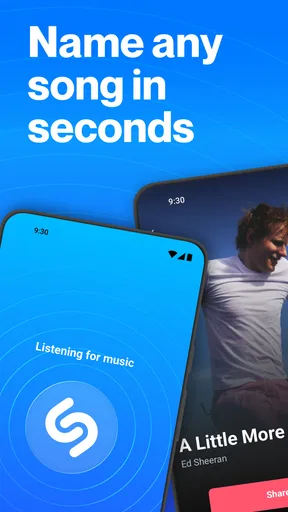
The central strength here is recognition. I open Shazam, tap to identify what is playing, and get a result with the track and artist when it succeeds. That makes the app useful even if I don’t know a lyric, genre, or any other clue that would help with a conventional search. I don’t have to interrupt a conversation to type, and I don’t need to remember the question until I get home.
There is a small but important difference between identifying music and discovering it. A streaming service is usually better when I already know what mood or artist I want; Shazam is designed for the opposite situation, when I hear something first and need a name. I think of it as a shortcut from sound to information, not as a replacement for a music library or a full listening app.
Guides and Analysis on Shazam: Find Music & Concerts
What the recognition workflow is good at
In everyday use, the best approach is to reach for the app while the song is still playing clearly. A short stretch with vocals or a distinctive instrumental passage gives recognition a better chance than a few muffled notes from across a busy room. If the first attempt doesn’t return a result, I try again when the chorus or another clearer section comes around instead of repeatedly tapping while people are talking over it.
That timing matters in places where the music is only briefly audible. At a café, I can identify a track during a lull, then return to my conversation rather than trying to catch every lyric. On a walk, I might hear a song through an open car window and have only a few seconds; in that case, Shazam is most useful if I already have it ready to open. The app turns a fleeting sound into a search starting point, but it can’t make a song easier to hear than it is.
Good for collecting discoveries, not just naming songs
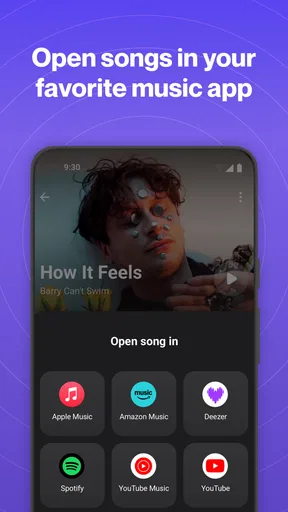
Once I have a match, I can use the result as a breadcrumb back to the music: check who made it, find more about the track, and decide whether I want to listen to it later. Shazam can connect with services such as Spotify and Apple Music, which helps if I want to move from recognition into listening or playlist-making. Those services remain separate destinations, though, so I treat the handoff as a convenience rather than assuming one tap will make every part of my music setup work the same way.
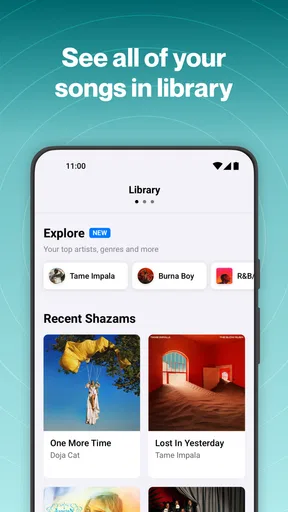
A useful habit is to identify a song as soon as I notice it, then review my finds when I have time to sort them. That is less disruptive than trying to build a playlist while standing in a queue or talking with friends. It also gives me a low-effort record of music I encountered away from home. The app is especially appealing to curious listeners who enjoy following a sound into an artist’s wider catalogue, but someone who only wants a single answer may not need to explore much beyond the match.
Worth Reading Before You Choose

Baby Panda World Brings Quick Play to Modern Phones, but Its Game Library Feels Busy

ESPN’s Live Game View Makes Following Close Games Easier

QuizzLand Review: A Good Fit for Short Trivia Breaks, Not Every Player

Basketball Stars: Multiplayer Is Fast, but Can It Recover When Matches Go Wrong?

WEBTOON Turns Phone Updates Into a Better Reading Routine

Link to Windows Runs on Shared Habits, Not Social Feeds
Discover Music at the Speed of Sound
Let's talk about the magic of Shazam. You know that feeling when you’re in a café or a party, and a song comes on that you just have to add to your playlist? With Shazam, all you need to do is tap the app, and within seconds, it'll let you know the song title, artist, and even the album. It's like having a personal DJ in your pocket. I found the app’s recognition speed to be blazing fast, and it’s pretty accurate too. It even picks up on obscure tracks that had me stumped for weeks.
Concert Alerts and More
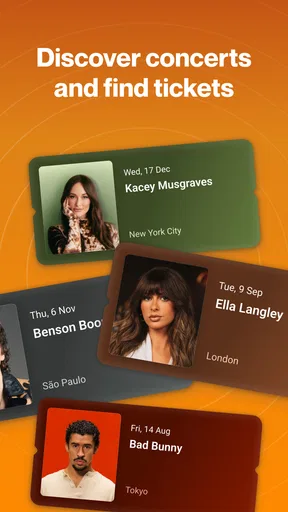
But wait, there's more! Not only does Shazam identify songs, but it also keeps you in the loop with upcoming concerts and events. You can easily buy tickets and mark your calendar directly from the app. For music lovers, this feature is a game-changer. I’ve snagged tickets to some pretty intimate gigs thanks to Shazam’s alerts.
Integration and Usability
Another thing I love about Shazam is its seamless integration with platforms like Spotify and Apple Music. Once you've Shazamed a song, you can instantly add it to your playlists. The app’s interface is intuitive, making navigation a breeze. Whether you’re a tech whiz or a casual user, you’ll find Shazam easy to use. Plus, it works offline! So, if you're somewhere without a solid internet connection, you can still capture the magic of that mystery track and check it later.
Community and Sharing
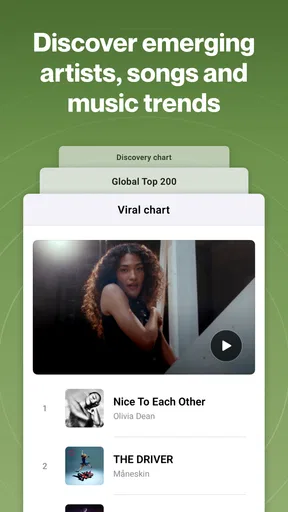
Shazam also lets you peek into a music community, showing you what’s trending globally. It’s like having a sneak peek into the world’s music taste. Sharing your finds with friends is a one-tap process, making it easy to spread the love of new music discoveries.
Where it fits among music apps
For a song you can’t name, the usual alternatives each have a different kind of friction. Searching a lyric works only if you catch and remember the words; asking a voice assistant can be convenient, but may feel awkward in a quiet shop or crowded room. A streaming app is a natural place to play a known track, yet it is less direct when all I have is a sound and a question. Shazam’s dedicated recognition flow is its advantage: it gives that single task a clear home on my phone.
That focus also defines its limits. It doesn’t replace the listening controls, recommendations, or library management I expect from a streaming service. If I already know the artist or have a lyric, searching directly in my music app may be quicker. If I want continuous background discovery rather than checking one song at a time, a radio or recommendation feature is the better fit. I use Shazam when the unknown track itself is the problem to solve.
Small habits that improve the result
When I’m in a noisy place, I move closer to the source if that’s comfortable and practical, and I wait for a relatively clean section of the song. I avoid holding the phone right beside another speaker or talking over the music, since competing sound can make a recognition attempt less useful. These are simple adjustments, but they make the difference between a clear sample and a guess based on a few scattered notes.
I also try not to treat a failed first attempt as proof that the song is unrecognizable. The sound may be too faint, the track may be mixed into dialogue, or the moment may simply be too short. A second try during a chorus is often a more sensible test. Once I get a match, I check the displayed details before sharing it; names and track versions can matter when a song has several recordings or edits, and the result is the start of the lookup rather than a reason to stop thinking critically.
A realistic use beyond the café
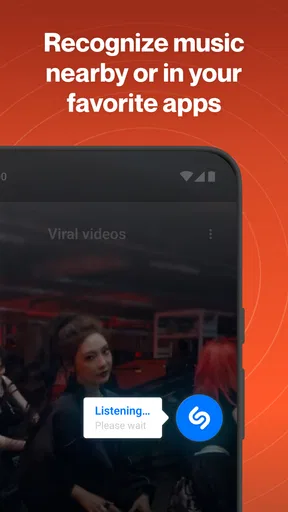
Imagine I’m watching a series with a song playing under a scene. I can open Shazam while the track is audible, save the identification for later, and then decide whether to explore the artist or send the find to a friend. That workflow is particularly handy when rewinding would interrupt the episode or when the credits move on quickly. It is less ideal if dialogue covers nearly all the music, so I keep expectations modest in scenes where the soundtrack is faint.
The same idea works at a gathering: I can identify a track without asking the host to pause the music or trying to catch a lyric over conversation. If I’m driving, I don’t use the phone while the car is moving; I wait until it is safe to interact. Shazam is best when curiosity can be answered without creating a distraction, not when getting a title matters more than paying attention to the people or situation around me.
Who will get the most from it
I’d recommend it to people who often hear music outside their own playlists and like following those discoveries: commuters, café regulars, frequent concertgoers, and anyone who watches shows with an ear for the soundtrack. It is also approachable for occasional users because the core task is easy to understand. Apple Inc. develops this free music and audio app, and its broad reach—over 500 million installs—makes it a familiar option for that quick identification job. Its average rating is 4.8 from around 12 million ratings, with a Teen age rating.
Someone who already uses a streaming service for every part of music discovery may find the extra app unnecessary if they rarely wonder about a song’s identity. Likewise, listeners who want a full-fledged music player first should choose the service that best fits their listening habits. Shazam makes more sense as a companion: I keep it available for the unexpected track, then use the result to decide where to go next.
What to expect after a match
A successful identification answers the immediate question, but it doesn’t decide what I should do with the song. I may want to save it, share it, look into the artist, or simply enjoy knowing the title and move on. That distinction keeps expectations realistic: the app is strongest at opening a door, while listening and organizing are shaped by the services and habits I already use.
For me, that is enough to justify keeping a dedicated recognizer around. It removes the guesswork from a small, common moment without demanding that every passing tune become a new playlist project. If I want broader recommendations, I go elsewhere; if I want the name of music playing nearby, this is the tool I reach for first.
In conclusion, Shazam: Find Music & Concerts is more than just a music-identifying app. It's a gateway to a world of music and events that you might otherwise miss. Whether you're an avid music lover or just someone who wants to know what that catchy song is, Shazam is a must-have on your smartphone. Trust me, once you start using it, you’ll wonder how you ever lived without it.
Pros
- Quickly identifies songs playing nearby.
- Integrates seamlessly with streaming services.
- Provides lyrics for sing-along fun.
- Discovers upcoming concerts near you.
- User-friendly interface and navigation.
Cons
- Requires internet for song identification.
- Occasional misidentification of songs.
- Limited offline functionality.
- Ads can be intrusive for free users.
- No customizable alert tones for matches.
FAQs for Shazam: Find Music & Concerts
How does Shazam identify songs?
Shazam uses a unique audio fingerprinting technology to identify songs. When you "Shazam" a track, the app records a short sample of the audio and compares it to its extensive database of music fingerprints. If it finds a match, it provides you with the song title, artist, and album information.
Can Shazam work offline?
Shazam requires an internet connection to identify tracks since it accesses a vast database online. However, you can use Shazam offline by storing the audio sample. Once you reconnect to the internet, Shazam will identify the song and give you the details.
Is Shazam compatible with all music streaming services?
Shazam integrates seamlessly with several music streaming services like Apple Music and Spotify. You can directly add identified songs to playlists on these platforms. However, integration may vary depending on the region and availability of specific streaming services.
Does Shazam offer features beyond song identification?
Yes, Shazam offers additional features like discovering new music through curated playlists, exploring artist pages for more songs and concert information, and connecting with friends to see what they're Shazaming. It's more than just a song identification tool; it's a music discovery platform.
Are there any privacy concerns with using Shazam?
Shazam collects data to improve its services, including song identification history and device information. However, it emphasizes user privacy and does not record any identifiable user information without consent. Users can manage their privacy settings and learn more in Shazam’s privacy policy.


